
MiniBiliA cleaner Bilibili experience
A free, ad-free and tracker-free third-party Bilibili client for iPhone, iPad, Apple Watch and Mac. Your app data stays on your device.


Requires the TestFlight app from the App Store · Beta full?
Latest: Build 1045 · 2026-10-27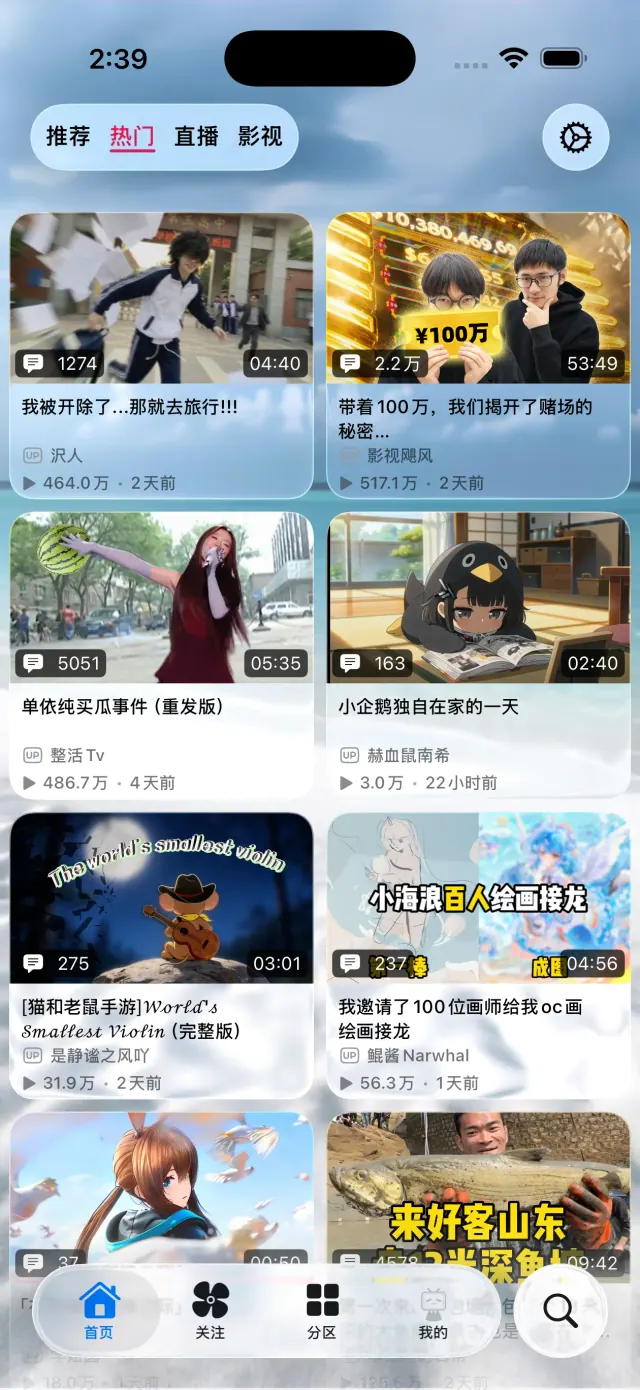
Screenshots
Crafted for every screen
Why MiniBili
Clean and free
MiniBili is a free, ad-free and tracker-free third-party client for Bilibili, built natively with SwiftUI for iOS, iPadOS, watchOS and macOS (tvOS in development, visionOS planned).
Private by design
Nothing is uploaded to any server of ours. Data is cached only on your device, and the app talks directly to Bilibili's servers.
No ads
Not a single ad anywhere in the app.
Completely free
Every feature is free. Sponsorship never unlocks extra features.
Features
Everything you use, native
Highlights of what MiniBili can do today. See the changelog (in Chinese) for every release.
Playback
- Danmaku (bullet comments): watch and send
- Hold to speed up, Picture in Picture
- Subtitles and Dolby Vision
- Multi-part videos and collections autoplay
- Dynamic Island and Lock Screen controls
- Audio-only mode with sleep timer
- Built-in SponsorBlock-style segment skipping (空降助手)
Browse
- Recommended, trending and category feeds
- Following feed (videos and posts)
- Anime, movies and live streams
- Search across videos, articles and more
- Creator profiles and uploads
Interact
- Like, coin, favorite and share
- Follow creators, Watch Later
- Comments and threaded replies
- Direct messages with stickers, cards and unsend
Downloads & images
- Offline video cache, up to 4K / HDR / 8K
- Download queue with resume
- View and save original images from comments and posts
Personalize
- Custom accent color and Liquid Glass styles
- Separate wallpapers for light and dark mode
- Subscribe to theme packs
- Single or two-column video cards
- English, Simplified and Traditional Chinese
Account & devices
- Sign in with SMS code or QR code
- Watch history and progress sync with Bilibili
- Incognito mode (don't sync history)
- Sign-in sync across iPhone, iPad, Mac and Apple Watch
- Split layout on iPad, Safari extension
Questions
FAQ
How do I install MiniBili with TestFlight?
1. Install Apple's TestFlight app from the App Store.
2. Open the TestFlight link on the device you want to use: iPhone, iPad and Apple Watch share one link, and Mac has its own.
3. Accept the invitation in TestFlight and tap “Install”. The Apple Watch app ships inside the iOS app.
TestFlight builds expire after a while, so keep MiniBili updated from TestFlight.
Does MiniBili work on iPad, Mac and Apple Watch?
Yes. MiniBili is available for iPhone, iPad, Apple Watch and Mac, and requires iOS 26.0+, iPadOS 26.0+, watchOS 26.0+, macOS 26.0+.
On iPad it uses a split layout on large screens; the Apple Watch app ships inside the iOS app; Mac has its own TestFlight link. An Apple TV (tvOS) version is in development and an Apple Vision Pro (visionOS) version is planned.
Is MiniBili free?
Yes. MiniBili is completely free with no in-app purchases, and every user gets the same features. Sponsorship only supports development and keeps your TestFlight seat; it never unlocks extra features.
How is MiniBili different from the official Bilibili app?
MiniBili is an unofficial third-party client maintained by an independent developer and is not affiliated with Bilibili.
It is built natively with SwiftUI, has no ads or trackers, and runs no servers of its own: every request goes straight to Bilibili's official API.
Some official features are still in development; see the roadmap for progress.
Do I need a Bilibili account? Is my account safe?
You can browse and play public videos without signing in. Signing in unlocks account features such as the following feed, likes, coins, favorites and direct messages.
Your login credentials are encrypted in the Apple Keychain on your device, and the developer cannot access your password. MiniBili does not collect any personal data; see the privacy policy for details.
Is MiniBili available in English?
Yes. The app interface is available in English, Simplified Chinese and Traditional Chinese. Videos, comments and other content come from Bilibili and are shown as published.
What if the TestFlight beta is full?
Apple TestFlight allows up to 10,000 external testers per app. When public seats are full, watch the Telegram group for announcements about new openings.
Afdian sponsors at the “股东”及旧版“大杯”、“超大杯” tiers keep their TestFlight access and are not affected by seat clean-ups.
Why won't some videos play?
Common causes:
1. The video is restricted, for example to paid supporters or Bilibili premium members.
2. An ad blocker (such as AdGuard) blocks the video host; allow mcdn.bilivideo.cn.
3. Some videos play when signed out but not when signed in, due to a known third-party API limitation.
4. A particular quality level is unavailable; try another one.
Is MiniBili on the App Store or available as an IPA?
No. TestFlight is the only way to get MiniBili. It will not be published on the App Store, and no IPA or third-party distribution is provided.
Community